
If you've ever used ArrayList in Java and wondered what the other list — LinkedList — is doing differently, this post is for you. We're going to walk through what linked lists are, why they exist alongside arrays, and how to build one from scratch. Then we'll level up to doubly linked lists, which are a small twist on the idea with surprisingly nice properties.
1. Where Linked Lists Live: The Java Collection Framework
Before diving in, it helps to know where LinkedList sits in Java's standard library.
A collection is just a container object that holds a group of other objects (called elements). Java's java.util package has an entire hierarchy of these:
Iterable (interface)
   └── Collection (interface)
         ├── List (interface)
         │     ├── ArrayList
         │     ├── LinkedList   ← our star today
         │     └── Vector → Stack
         ├── Queue (interface)
         │     ├── PriorityQueue
         │     └── Deque → ArrayDeque
         └── Set (interface)
               ├── HashSet
               ├── LinkedHashSet
               └── SortedSet → TreeSet
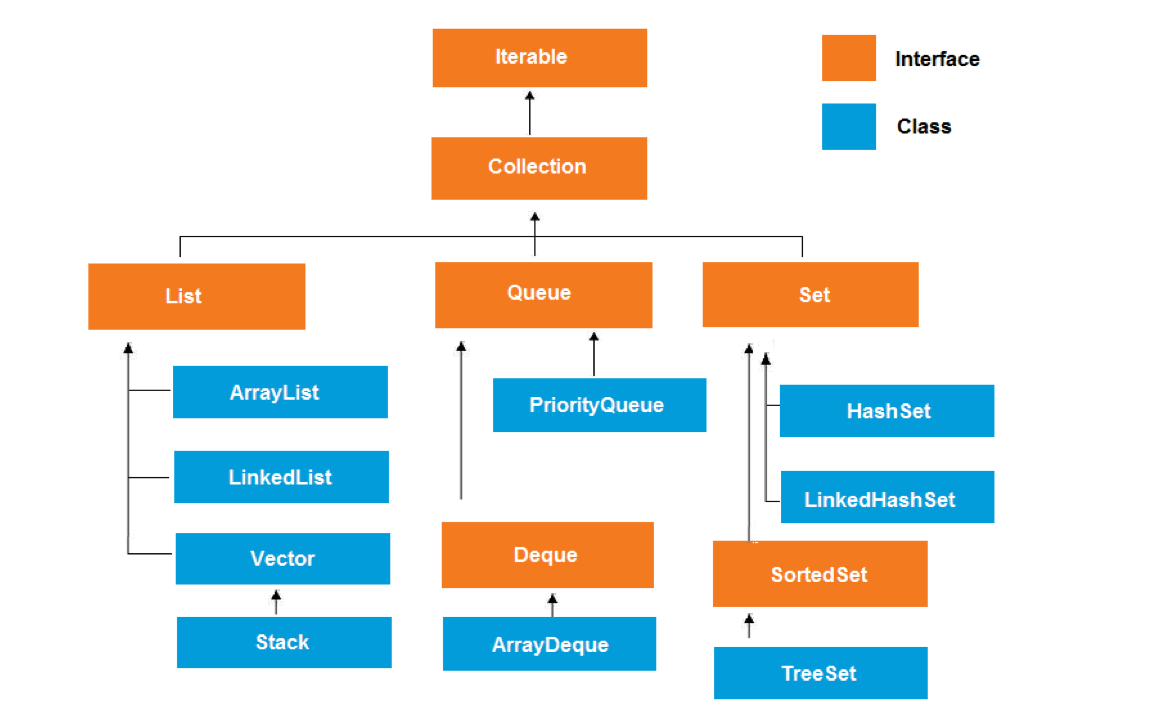
The orange boxes in the picture are interfaces (contracts that say what operations exist), and the blue ones are classes (actual implementations). LinkedList is one concrete way to implement the List interface.
The Collection interface defines operations every collection should support — things like add, remove, contains, size, isEmpty, iterator, and so on. Whether you use ArrayList or LinkedList, you get all these methods.
2. What Is a List, Conceptually?
A list is an Abstract Data Type (ADT) that stores data in sequential order. Think of any everyday list — a class roster, a to-do list, books on a shelf. The common operations we care about are:
- Retrieve an element
- Insert a new element
- Delete an element
- Find how many elements are in the list
- Check if an element exists
- Check if the list is empty
The key word above is abstract. A "list" doesn't say how the data is stored — only what you can do with it. There are two main ways Java actually implements lists under the hood:
- Using an array —
ArrayList. The array grows dynamically: when it gets full, Java creates a bigger one and copies everything over. - Using a linked structure —
LinkedList. Each element lives in its own little container (a "node"), and the nodes are chained together with references.
Array or Linked List? Which Should You Use?
Both work. They have different trade-offs:
Use an array (ArrayList) when:
- You need fast access by index (
get(5)is instant — O(1)) - You mostly add to the end of the list
- ❌ Inserting or deleting in the middle is slow, because everything after it has to shift
Use a linked list when:
- You frequently add or remove elements anywhere in the list
- You don't need random access by index very often
- ❌ Getting the 500th element requires walking through 500 nodes
A good rule of thumb: arrays are like books on a shelf (easy to grab the 5th one, painful to insert a new book at position 2). Linked lists are like a chain of paper clips (easy to splice in or pull out anywhere, but you have to start from one end to find the middle one).
3. Introducing the Linked List: The Pop-Chain Analogy
Imagine a child's toy "pop chain" — each piece has a connector on one side and a socket on the other. To build a chain, you push the connector of one piece into the socket of the next.
A linked list works exactly like this. Each node is one piece, and each piece is linked to the next.
Inserting a piece anywhere in the chain: you just break one connection, pop in the new piece, and reconnect. The other pieces don't move.
Removing a piece: break the two connections around it, take it out, then bridge the two neighbors back together.
This is the magic of linked lists: insertion and deletion are local operations. You only need to update the links right around the change — the rest of the list is undisturbed. With an array, inserting at the start means shifting every other element over by one. With a linked list, no shifting required.
4. Nodes: The Building Blocks
Each node in a linked list has two parts:
- The element (the actual data — a String, an Integer, whatever)
- A reference (or "pointer") to the next node In Java, a node looks like this:
class Node<E> {
    E element;        // the data
    Node<E> next;     // reference to the next node

    public Node(E o) {
        element = o;
    }
}
A whole list, then, is a chain of these:
head → [Chicago | next] → [Denver | next] → [Dallas | null] ← tail
We keep two convenience references:
head— points to the first nodetail— points to the last node
The very last node's next is null — that's how we know we've reached the end.
Heads up: each node can physically live anywhere in memory. The
nextpointers are what tie them together logically. This is different from an array, where elements are packed side-by-side in memory.
5. Building a List Step by Step
Let's create a list of three city names: "Chicago", "Denver", "Dallas".
Step 1: Start empty
Node<String> head = null;
Node<String> tail = null;
// The list is empty.
Step 2: Add the first node ("Chicago")
head = new Node<>("Chicago");
tail = head;
After this:
head → [Chicago | null] ← tail
Both head and tail point to the same single node.
Step 3: Add the second node ("Denver")
tail.next = new Node<>("Denver");
tail = tail.next;
We attach the new node to the current tail's next, then move tail forward.
head → [Chicago | next] → [Denver | null] ← tail
Step 4: Add the third node ("Dallas")
tail.next = new Node<>("Dallas");
tail = tail.next;
head → [Chicago | next] → [Denver | next] → [Dallas | null] ← tail
That's a linked list! Three nodes, chained together, with head at the front and tail at the back.
6. Traversing the List
To visit every node, we start at head and follow next pointers until we hit null:
Node<E> current = head;
while (current != null) {
    System.out.println(current.element);
    current = current.next;  // step forward
}
This is the bread-and-butter pattern of working with linked lists. Almost every operation uses some variant of this walk.
7. Building Our Own MyLinkedList Class
Let's wrap all this up into a proper class. It'll keep track of head, tail, and size, and offer methods to add/remove elements:
public class MyLinkedList<E> {
    private Node<E> head;
    private Node<E> tail;
    private int size;

    // ... methods below
}
Now let's implement the core operations.
addFirst(E e) — Add to the Head
public void addFirst(E e) {
    Node<E> newNode = new Node<>(e);
    newNode.next = head;        // new node points to current head
    head = newNode;             // new node becomes the head
    size++;
    if (tail == null)           // if list was empty, new node is also tail
        tail = head;
}
The trick is to set the new node's next before reassigning head. Otherwise we'd lose the rest of the list.
addLast(E e) — Add to the Tail
public void addLast(E e) {
    if (tail == null) {                  // list is empty
        head = tail = new Node<>(e);
    } else {
        tail.next = new Node<>(e);       // old tail now points to new node
        tail = tail.next;                // new node becomes the tail
    }
    size++;
}
add(int index, E e) — Insert at a Specific Position
This is the most general case. We handle the easy cases first, then walk to the position:
public void add(int index, E e) {
    if (index == 0) {
        addFirst(e);
    } else if (index >= size) {
        addLast(e);
    } else {
        Node<E> current = head;
        for (int i = 1; i < index; i++) {
            current = current.next;       // walk to the node BEFORE the index
        }
        Node<E> temp = current.next;      // remember what comes after
        current.next = new Node<>(e);     // splice new node in
        current.next.next = temp;         // new node points to the rest
        size++;
    }
}
The key idea: to insert at index i, we stop one node before. We then "splice" — break the existing link and reconnect on both sides of the new node.
removeFirst() — Remove the Head
public E removeFirst() {
    if (size == 0) return null;
    Node<E> temp = head;
    head = head.next;       // second node becomes head
    size--;
    if (head == null) tail = null;   // list is now empty
    return temp.element;
}
removeLast() — Remove the Tail
Trickier in a singly linked list! Why? Because to remove the tail, we need to update the second-to-last node's next to null. But the tail doesn't have a "previous" pointer, so we have to walk from the head to find it.
public E removeLast() {
    if (size == 0) return null;
    if (size == 1) {                     // only one node
        Node<E> temp = head;
        head = tail = null;
        size = 0;
        return temp.element;
    }
    Node<E> current = head;
    for (int i = 0; i < size - 2; i++)   // stop at second-to-last
        current = current.next;
    Node<E> temp = tail;
    tail = current;
    tail.next = null;
    size--;
    return temp.element;
}
This is O(n) — not great. This is exactly the kind of problem that the doubly linked list (coming later) solves.
remove(int index) — Remove at a Specific Position
public E remove(int index) {
    if (index < 0 || index >= size) return null;
    if (index == 0) return removeFirst();
    if (index == size - 1) return removeLast();

    Node<E> previous = head;
    for (int i = 1; i < index; i++)
        previous = previous.next;        // stop just before the target
    Node<E> current = previous.next;     // this is the node to remove
    previous.next = current.next;        // bypass it
    size--;
    return current.element;
}
Notice we orphan the removed node by skipping over it. Java's garbage collector will clean it up.
8. Variations: Singly, Circular, Doubly
What we built above is called a singly linked list — each node has exactly one pointer (next), and traversal can only go forward. To get to any node, you must start at head and walk one step at a time. It's not a direct access structure (unlike arrays).
There are a few common variations:
Circular Linked List
Just like a singly linked list, except the last node's next points back to the first node (instead of null). The list becomes a loop.
head → [A | next] → [B | next] → [C | next] ┐
        ↑___________________________________│
Useful for things like round-robin schedulers or any "cyclic" data.
Doubly Linked List
Each node has two pointers: one to the next node, and one to the previous node. You can traverse the list in both directions.
null ← [prev | A | next] ⇄ [prev | B | next] ⇄ [prev | C | next] → null
Circular Doubly Linked List
Doubly linked, plus the ends connect to each other (last's next → first, first's prev → last). A loop you can walk in either direction.
The rest of this post focuses on the doubly linked list, since it's the most useful variation in practice (it's actually what Java's built-in LinkedList class uses internally).
9. Doubly Linked Lists: The Real Workhorse
A doubly linked list is a linked structure where each node has two reference fields — one pointing to the next node, one pointing to the previous node.
Visually:
        ┌──────┐ next  ┌──────┐ next  ┌──────┐
null  ← │  12  │  ⇄    │  99  │  ⇄    │  37  │ → null
        └──────┘ prev  └──────┘ prev  └──────┘
You can think of it as two singly linked lists layered on the same data — one going forward, one going backward.
Why bother?
The two-pointer design gives us two big wins:
- Bidirectional traversal. You can iterate forward or backward.
- Simpler local modifications. When inserting or deleting a node, you don't have to walk the list to find its "previous" — you already have it via
prev. This is what makesremoveLast()fast in a doubly linked list.
The trade-offs
It's not all free:
- Each node needs extra memory (one more pointer per node).
- Insertion and deletion update more pointers (4 link updates instead of 2), so each operation does slightly more work — though it's still O(1) when you already have a reference to the node.
For most use cases, the benefits win. That's why Java's standard
LinkedList<E>is doubly linked.
10. Building a Doubly Linked List
The Node class
public class Node<E> {
    E element;
    Node<E> next;
    Node<E> prev;

    public Node(E element, Node<E> next, Node<E> prev) {
        this.element = element;
        this.next = next;
        this.prev = prev;
    }

    public Node(E element) {
        this(element, null, null);
    }
}
The List class
public class DoublyLinkedList<E> {
    private Node<E> head;
    private Node<E> tail;
    private int size;

    public DoublyLinkedList() {
        size = 0;
        this.head = null;
        this.tail = null;
    }

    // ... methods below
}
11. Doubly Linked List: Insertion
There are three cases (same as singly linked):
- Insert at the beginning —
addFirst(E) - Insert at the end —
addLast(E) - Insert at the middle —
add(int index, E)
addFirst(E element) — Insert at the Beginning
Two changes are needed: the new node's next should point to the old head, and the old head's prev should point to the new node.
public void addFirst(E element) {
    Node<E> tmp = new Node<>(element, head, null);
    if (head != null) head.prev = tmp;     // old head's prev now points back
    head = tmp;                            // new node is the head
    if (tail == null) tail = tmp;          // if list was empty, also the tail
    size++;
    System.out.println("adding: " + element);
}
addLast(E element) — Insert at the End
Mirror image:
public void addLast(E element) {
    Node<E> tmp = new Node<>(element, null, tail);
    if (tail != null) tail.next = tmp;     // old tail's next points forward
    tail = tmp;                            // new node is the tail
    if (head == null) head = tmp;          // if list was empty, also the head
    size++;
    System.out.println("adding: " + element);
}
add(int index, E element) — Insert in the Middle
public void add(int index, E element) {
    if (index < 0 || index > size)
        throw new IndexOutOfBoundsException();

    if (index == 0) {
        addFirst(element);
    } else if (index == size) {
        addLast(element);
    } else {
        // Walk to the node currently at the target index
        Node<E> temp = head;
        for (int i = 0; i < index; i++) {
            temp = temp.next;
        }
        // Create new node, sitting between temp.prev and temp
        Node<E> insert = new Node<>(element, temp, temp.prev);
        temp.prev.next = insert;   // link 1: prev's next → new node
        temp.prev = insert;        // link 2: temp's prev → new node
        size++;
    }
}
The trick: when inserting at index i, the new node will become the node at index i, and the existing node at index i shifts to index i+1. So we walk to the existing node at index i, then splice the new one in just before it.
Four pointer updates happen here:
- New node's
next→ existing node (set in constructor) - New node's
prev→ existing node's prev (set in constructor) - The previous node's
next→ new node - The existing node's
prev→ new node
12. Doubly Linked List: Traversal
Forward (same as singly linked):
public void iterateForward() {
    System.out.println("iterating forward..");
    Node<E> tmp = head;
    while (tmp != null) {
        System.out.print(tmp.element + " ");
        tmp = tmp.next;
    }
}
Backward — this is where doubly linked shines:
public void iterateBackward() {
    System.out.println("iterating backward..");
    Node<E> tmp = tail;
    while (tmp != null) {
        System.out.println(tmp.element);
        tmp = tmp.prev;
    }
}
Start from tail, follow prev pointers. Impossible to do efficiently in a singly linked list.
13. Doubly Linked List: Deletion
Three cases again.
removeFirst() — Delete the Head
public E removeFirst() {
    if (size == 0) throw new NoSuchElementException();
    Node<E> tmp = head;
    head = head.next;            // second node becomes head
    if (head != null) head.prev = null;   // new head has no previous
    size--;
    System.out.println("deleted: " + tmp.element);
    return tmp.element;
}
removeLast() — Delete the Tail
Much easier than in a singly linked list! No need to walk the list — tail.prev is right there:
public E removeLast() {
    if (size == 0) throw new NoSuchElementException();
    Node<E> tmp = tail;
    tail = tail.prev;            // second-to-last becomes tail
    if (tail != null) tail.next = null;
    size--;
    System.out.println("deleted: " + tmp.element);
    return tmp.element;
}
This is O(1) — instant. That's the doubly linked list paying its rent.
remove(int index) — Delete in the Middle
public E remove(int index) {
    E element = null;
    if (index < 0 || index >= size)
        throw new IndexOutOfBoundsException();

    if (index == 0) {
        return removeFirst();
    } else if (index == size - 1) {
        return removeLast();
    } else {
        Node<E> temp = head;
        for (int i = 0; i < index; i++)
            temp = temp.next;          // walk to the target node
        element = temp.element;

        // Splice it out
        temp.next.prev = temp.prev;    // next node's prev skips over temp
        temp.prev.next = temp.next;    // previous node's next skips over temp
        temp.next = null;              // clean up references
        temp.prev = null;
        size--;
    }
    return element;
}
The two key lines are the splice:
temp.next.prev = temp.prev— the node aftertempnow points back to the node beforetemptemp.prev.next = temp.next— the node beforetempnow points forward to the node aftertempTogether, they "skip over"temp, removing it from the chain.
14. Bonus: clear() — Wipe the List
public void clear() {
    Node<E> temp = head;
    while (head != null) {
        temp = head.next;
        head.prev = head.next = null;   // disconnect the current head
        head = temp;                    // advance
    }
    temp = null;
    tail.prev = tail.next = null;
    size = 0;
}
We walk through and explicitly null out every pointer. This helps the garbage collector reclaim memory promptly.
15. Wrapping Up
Here's the mental model to take with you:
- A linked list is a chain of nodes connected by references. No contiguous memory required, no shifting needed when inserting in the middle.
- Singly linked = forward pointers only. Cheap, but you can't go backward, and finding "the previous node" requires walking from the head.
- Doubly linked = pointers in both directions. A bit more memory and slightly more work per update, but everything becomes simpler and
removeLast()becomes O(1). - Circular = the ends loop back. Useful for cyclic data.
When should you reach for a linked list in real code? Honestly, in most everyday Java,
ArrayListwins — it's faster in practice because modern CPUs love contiguous memory. But linked lists shine when: - You're frequently inserting/removing at known positions (especially at both ends — use
Deque/LinkedList) - You're building other data structures on top (queues, stacks, LRU caches, adjacency lists for graphs)
- The teaching value alone: understanding linked lists makes trees, graphs, and many other structures click.
That last point is the real reason this is taught early. Linked lists are the gateway to thinking about structures made of nodes and references — and that mental model is everywhere in computer science.